LTS X-VMS
LTS Panel Network Requirements
For the LTS panel to successfully connect to the Garber Cloud, the panel must be able to receive updates directly from the server managed by Garber Connect — also known as port forwarding.
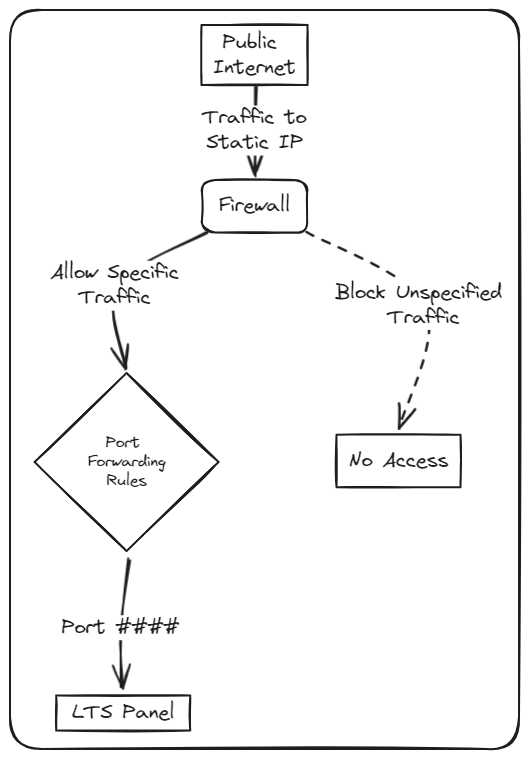
Option 1 — Static IP
If you have an IP address that never changes (a static IP) from your Internet Service Provider, you will need to change the configuration on your firewall to allow traffic from the Garber Cloud to the panel. The port you need to forward will be given to you by an installation technician.
Option 2 — Dynamic IP
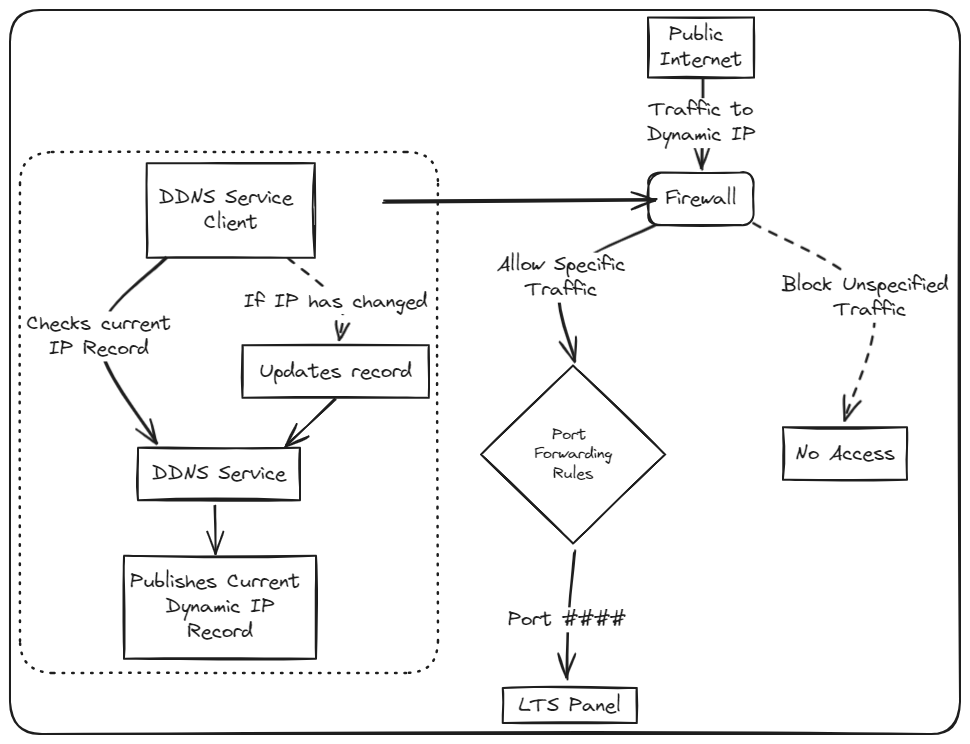
If you do not have a static IP address, you will have a dynamic IP address from your Internet Service Provider. A dynamic IP may change whenever your ISP changes anything on their network and/or if your network equipment reboots.
To get around this, the Garber Connect team will work with you to set up a Dynamic DNS (DDNS) service that gives you a fixed domain name no matter how often your ISP changes your IP address. Once the DDNS service is set up, you will still need to allow traffic from the Garber Cloud to the panel. The port you need to forward will be given to you by an installation technician.